ONIONGATE
Per-app Tor circuits.
Host onion sites.
Check for leaks.
A desktop app that routes individual apps through isolated Tor circuits, turns a local port into a v3 onion site, and inspects whether anything is leaving outside Tor. It bundles and manages Tor for you, with a headless CLI for servers. macOS, Linux, and Windows.
- per-app circuitsisolated Tor
- onion hostingv3 + client auth
- verifyegress boundary
- TUN / SOCKSrouting modes
- bridgesobfs4 · snowflake
- CLIheadless
What is OnionGate?
OnionGate is an open-source desktop app for people who want Tor routing, onion hosting, and a leak check in one place, without configuring Tor by hand. It manages Tor for you and ships a headless CLI for servers. It is alpha software and not a replacement for a two-machine gateway on high-risk work.
- [*]
Per-app Tor circuits Give each app its own isolated circuit. A macOS and Linux Session Guard suspends matching processes if their Tor or TUN route drops.
- [*]
Onion hosting Expose 127.0.0.1:<port> as a v3 onion service with client authorization and a QR handoff.
- [*]
Temporary or permanent sites Temporary keys vanish at stop. Permanent sites keep one address across restarts, with named credentials you can revoke individually.
- [*]
Leak verifier A background watch lists processes with clearnet TCP that is not going through OnionGate. Run on-demand checks for egress, DNS, IPv6, and UDP/QUIC, then export a redacted report.
- [*]
SOCKS and TUN routing SOCKS is the easy path any app can ignore. TUN pulls most TCP on the machine through Tor and blocks UDP/QUIC.
- [*]
Maximum Isolation on macOS A kernel pf default-deny so leftover public IP, including Apple daemons, cannot leave the NIC except to Tor's allowlisted endpoints.
- [*]
Bridges for censored networks Use obfs4 or Snowflake-style bridges when a direct connection to Tor is blocked.
- [*]
Tray control Check status, connect or disconnect, rotate identity, or run Emergency Restore from the native macOS, Linux, or Windows widget.
- [*]
Headless CLI oniongate-cli hosts onion sites on servers with no GUI.
Get started
- 1.
Install
- 2.
Connect
- 3.
Host a loopback port as an onion site
- 4.
Check for leaks
Connect · host · verify · setup
A look at the main screens of the desktop app.
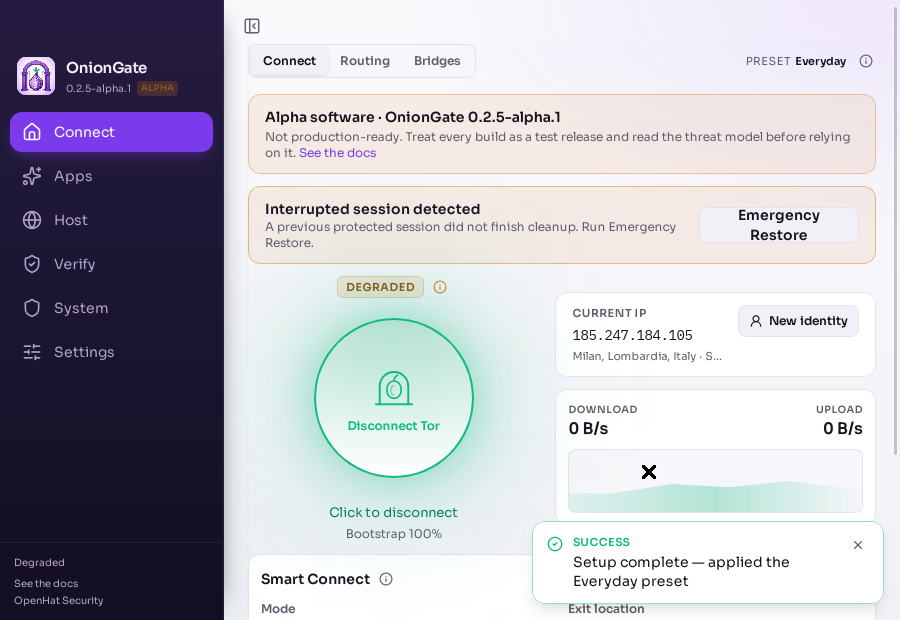
Connect to Tor
Smart Connect bootstraps managed Tor and shows the exit IP and live throughput.
- [*]SOCKS or TUN mode. TUN pulls most TCP on the machine through Tor.
- [*]Rotate to a new identity, or run Emergency Restore if a session is interrupted.
Live from GitHub
openhat-security/oniongate · GPL-3.0 · 2h ago · ★ 2 · 42 commits
FAQ
What is OnionGate?
A desktop app that routes individual apps through isolated Tor circuits, hosts a loopback port as a v3 onion site, and inspects whether traffic is leaving outside Tor. It bundles and manages Tor for you and ships a headless CLI for servers.
Is OnionGate a VPN or Tor Browser?
No. It is not a VPN, Tor Browser, Tails, Whonix, or a two-machine Tor gateway, and it does not stop browser fingerprinting or global traffic correlation. It must not be the sole control for high-risk work. Read the threat model first.
Which platforms are supported?
macOS, Linux, and Windows. The macOS NIC default-deny (Maximum Isolation) is macOS-only. Pre-1.0 macOS and Windows builds are not signed with an OS vendor certificate, so Gatekeeper and SmartScreen warn on first launch.
Do I need the Tor Browser launcher for normal browsers?
No. Connect in TUN mode and Chrome, Firefox, Safari, and most apps reach the network through OnionGate's Tor. The Tor Browser launcher is only for running Tor Browser itself against OnionGate's managed Tor.
What is the difference between temporary and permanent onion sites?
A temporary site discards its key when it stops, so the address can never be recreated. A permanent site keeps the same address across restarts and supports named client credentials you can revoke individually.
What does Verify actually check?
It lists live sockets classified as through Tor or not, and runs on-demand diagnostics for egress separation, DNS, IPv6, and UDP/QUIC. Public IPs are compared in memory and never stored. It is not packet capture or a formal proof.
Is it stable?
No. OnionGate is alpha. Every published build is alpha software and should not be relied on for high-risk activity. Verify the checksum, SBOM, and provenance before running anything.
Is OnionGate open source?
Yes, under GPL-3.0. Issues and pull requests are welcome on GitHub. OnionGate is an independent project, not affiliated with or endorsed by The Tor Project.
Collaborate
Want to contribute, or looking for privacy and offensive-security work?
OnionGate is open source under GPL-3.0. It lives at OpenHat Security alongside PhishKit, truffles, and RunHug. If you want to work on routing modes, the leak verifier, onion hosting, or platform support, open a discussion or email Adam. Report security issues privately per the security policy, never in a public issue.